Friday, June 3, 2011

Cannot retrieve properties at this time - Content Editor Web Part Error

Sometimes, when I edit content in a Content Editor Web Part, I encounter the following error :
Cannot retrieve properties at this time
The solution is simple, do the following.
On the SharePoint Server:
  1. Open IIS Manager.
  2. In the left pane, expand the server where SharePoint is installed and then click on Application Pools.
  3. Right-click on the application pool from which you get the error.
  4. Click on Recycle.
  5. Close IIS Manager.
  6. Retry saving your work.

Monday, May 16, 2011

Content Sources won't crawl as scheduled

I've encoutered the following problem, in the Manage Content Sources screen, I saw the next crawls scheduled and the time would change for the next one, but Last Crawl Completed never changed. Futhermore, when I went in the Services on Server screen from the Operation Central Administration section, the status for the Office SharePoint server Search service was Starting (for days) and the comment was Required on farm.

Here's how I solved the problem.
  • On the SharePoint server, in a command prompt, run the following commands,
    1. stsadm -o osearch -action stop
    2. stsadm -o osearch -action start -role IndexQuery
  • Then, in Central Administration,
    1. in the left menu, click Shared Services Administration,
    2. open the menu for your Shared Services, and then click on Edit Properties,
    3. in the Index Server section, select your Index server,
    4. click OK.

Tuesday, May 3, 2011

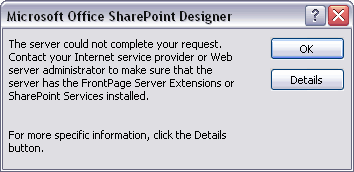
The server could not complete your request in SharePoint Designer

From time to time I'm getting the following error when I want to edit an aspx page from SharePoint Designer.
The server could not complete your request. Contact yout Internet service provider or Web server administrator to make sure that the server has the FrontPage Server Extensions or SharePoint Services installed.


The solution is simple, do the following.
On the SharePoint Server:
  1. Open IIS Manager.
  2. In the left pane, expand the server where SharePoint is installed and then click on Application Pools.
  3. Right-click on the application pool from which you get the error.
  4. Click on Recycle.
  5. Close IIS Manager.
  6. Open your aspx page.